
From QR Scan to Behaviour Insight in Under 30 Seconds
LearnerLink replaces scattered logbooks, inconsistent tracking, and end-of-term guesswork with one live system that every teacher, parent, and HOD can trust.
And it saves admin time... LOTS.
Three Steps. That's It.
The Teacher
What they do:
- Scan a learner's QR code with their phone
- Select the behaviour incident from a list
- Submit — done in under 30 seconds
What they never have to do:
- Open a laptop
- Log into anything
- Remember a password
- Written merit/demerit capturing on classlists, merit books etc.
- Write a note home
The SMT
What they see:
- Live class dashboards updated in real time
- Automatic weekly PDF reports every Sunday evening
- Merit-to-demerit ratios per class and per grade
- Students trending toward intervention — before it becomes a crisis
What they never have to do:
- Chase teachers for data
- Compile reports manually
- Ask "how is 6B doing this term?"

The Parent
What they receive:
- An email the moment a merit or demerit is logged
- Their child's running total of merit and demerit points
- Milestone alerts when rewards are earned
- A personalised Behaviour Report at the end of each term
What they never have to do:
- Wait for a school report to find out
- Call the school to follow up on behaviour
- Be surprised at parents' evening
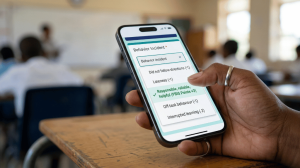
This is how easy it is to log an incident on LearnerLink. In this example, the teacher logged a single merit and added an optional note.
THE 7-STEP FLOW
1. THE INCIDENT HAPPENS
📍 In the classroom, on the field, in the corridor
A teacher observes a behaviour — positive or negative. Instead of making a mental note and hoping to remember later, they reach for their phone.

2. SCAN THE QR CODE
📷 5 seconds
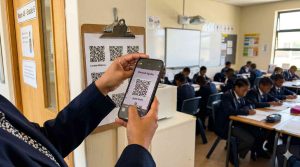
Every learner has a unique QR code printed on a class list. The teacher scans it.
No login. No searching. No typing names.
3. SELECT THE INCIDENT
☑️ 20 seconds
A Google Form opens instantly, pre-filled with the learner's name and class.
The teacher chooses his/her name, then the incident type from a dropdown list, and adds an optional Note.
Tap SUBMIT.
Done.
4. LEARNERLINK PROCESSES THE SUBMISSION
⚙️ Automatic — 0 seconds of teacher effort
The moment the form is submitted, LearnerLink automatically:
- Records the incident in the central database
- Updates the learner's running point total
- Checks whether a milestone has been crossed
- Prepares and sends the parent notification email
Your teacher is already back to teaching without having to worry about any of that.

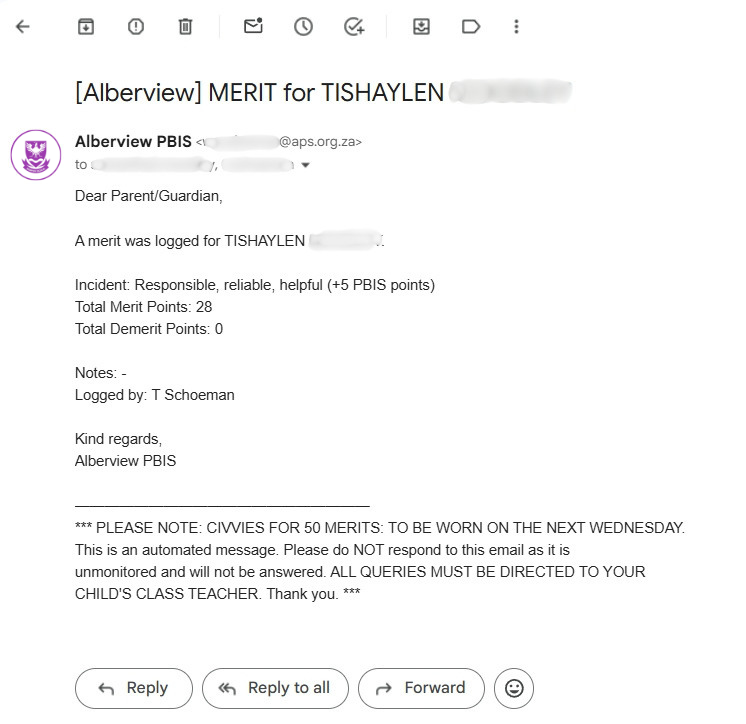
5. THE PARENTS ARE NOTIFIED
📧 Within seconds
An email lands in the parent's inbox — personalised, clear, and factual. It states what happened, who logged it, the learner's current merit and demerit point totals, and (if applicable) a milestone alert.
No notes lost in a school bag. No delays.
6. SMT STAYS INFORMED
📊 Ongoing — always up to date
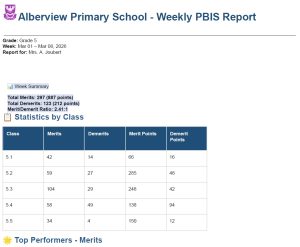
Every submission updates the live class dashboard in real time. SMT can check any class's behaviour profile at any moment — without asking anyone.
Every Sunday evening, a formatted PDF report lands in each SMT member's inbox automatically, covering the full week.
7. END OF TERM - EVERY LEARNER GETS A REPORT
📄 Generated in minutes, not days
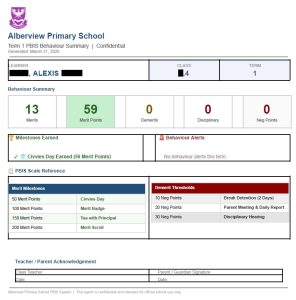
At the end of each term, LearnerLink generates one individual behaviour summary report per learner — showing their full term statistics, milestones earned, and any behaviour alerts triggered.
The class teacher receives the reports. Print. Sign. Send home.
A full class of individual reports, ready in under five minutes.
Numbers from our First Pilot School
- 11,500+ behaviour incidents tracked in 8 weeks
- 6:1 merit-to-demerit ratio
- 1,387 learners tracked across Grades R to 7
- < 30 seconds from scan to submission
What LearnerLink Doesn't Do
- It doesn't replace your school's discipline policy. It tracks and supports the one you already have.
- It doesn't require expensive hardware. Any phone, tablet, or computer with a browser will work.
- It doesn't need training days or consultants. If your teachers can use WhatsApp, they can use LearnerLink.
- It doesn't lock you in. If it doesn't work for your school, you walk away after 30 days.
WHAT ABOUT SETUP?
Setup Takes One Week. Not One Semester.
From first call to first submission in five working days*.
(*Subject to a Google Workspace for Education Account)
- Day 1. Onboarding: We walk through the system together. You provide your class lists, teacher names, and parent emails. We handle everything from there.
- Day 2. System Configuration: LearnerLink is configured for your school. Your classes, your teachers, your incident types, your milestone rewards. Everything is set up to match your existing approach.
- Day 3,4. Online Staff Briefing: A 10-minute briefing for your teaching staff. That's all the training required. No workshops. No lengthy manuals. No follow-up sessions.
- Day 5. Go Live: QR codes distributed. Forms active. First submissions logged. Your school is running LearnerLink.
No IT department required. LearnerLink runs on Google Workspace for Education, which is free for qualifying South African schools.
There is no software to install, no server to maintain, and no technical expertise needed to operate it day-to-day.
No monthly hosting or additional admin fees.